
Guide for updating the Kubernetes cluster –
part 1
- 28 February 2025
- In this article, you will learn:
- Updating services relying on PSP
- Making a backup copy of the cluster
- Making a copy of ETCD
- ArgoCD
- Setting up the application in ArgoCD
- The structure of the application manifest
- Initial operations before the implementation of MetalLB into ArgoCD
- Proper assigning of IP addresses
- Maintaining Stable IP Addresses
- Setting up manifest declarations
- Setting up configmap and IPAdressPool
- Comparing ArgoCD to the environment
- Setting up the manifest
- The update of MetalLB
- Summary
- FAQ
- Let's have a chat!
In this article, you will learn:
- how to prepare a Kubernetes cluster for the upgrade to version 1.25 after the removal of PodSecurityPolicy,
- which services using PSP should be updated before migration, including MetalLB, Portworx, Prometheus Stack and Blackbox Exporter,
- why a full backup of the cluster, certificates, manifests and ETCD should be performed before the upgrade,
- how to use ArgoCD for a safe MetalLB upgrade, change comparison and potential rollback.
Each technological innovation brings out challenges, but also new possibilities. In the newest version of the Kubernetes cluster, PodSecurityPolicy (PSP) is replaced by the most flexible and modern method Pod Security Admission (PSA). In this article, we present the key steps to follow to update the cluster, with a focus on the services that used to rely on PSP.
Updating services relying on PSP
At first, we present the key elements for the management and monitoring of the cluster when it comes to updates and compliance with the highest security standards. In any situation, it is always best to have the newest software versions, that have been optimized to comply with the highest security standards and to ensure the stability and reliability of the cluster.
- Metallb – for the management of LoadBalancer
Metallb plays a key role in the management of LoadBalancer services within the cluster. Before the migration, you should have the latest version of Metallb, optimized for cooperation with Pod Security Admission.
2. Portworx – for storage management
When using Portworx for storage management, it is advised to have the latest version, fully compliant with the new security policy.
3. Prometheus Stack – for cluster monitoring
If you are using tools from the Prometheus stack for monitoring the cluster, you need to update Prometheus stack to the newest version, to avoid any issues related to security.
4. Blackbox Exporter – for monitoring remote services
It is advised to check that blackbox-exporter – which is responsible for the monitoring of remote services – complies with the newest security standards.
You can get the list of the resources to update with the following command:
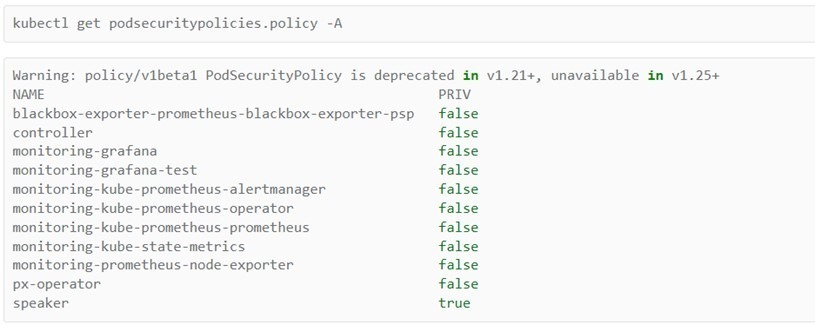
Where:
- px-operator = portworx,
- speaker, controller = metallb,
- monitoring = prometheus,
- blackbox-exporter = blackbox-exporter.
In this article, we analyze the update of ArgoCD and Metallb.
Making a backup copy of the cluster
The process of making a backup is very similar to the updating process of Kubernetes (k8s) to the 1.24 version.
You will find below instructions on how to create a backup copy of the Kubernetes cluster, including a copy of the certificates, manifests, and ETCD data.
To secure the certificates and manifests from the Kubernetes cluster, you can use the rsync tool:

The rsync tool allows you to copy folders from /etc/kubernetes/pki/ and /etc/kubernetes/manifests/ while preserving the structure of catalogs. Additionally, you can exclude useless folders, f.e. tmp. files.
Making a copy of ETCD
Before making a copy of ETCD, you need to confirm the location of the certificates and the endpoint, with the following command:

You can then make a backup copy of ETCD, with the following command:
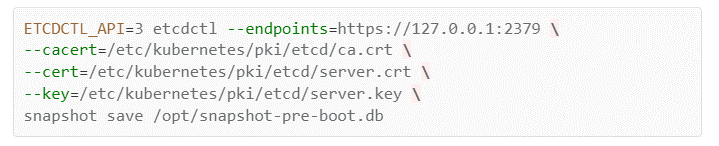
The present commands will create an ETCD backup in the snapshot-pre-boot.db. file.
ArgoCD
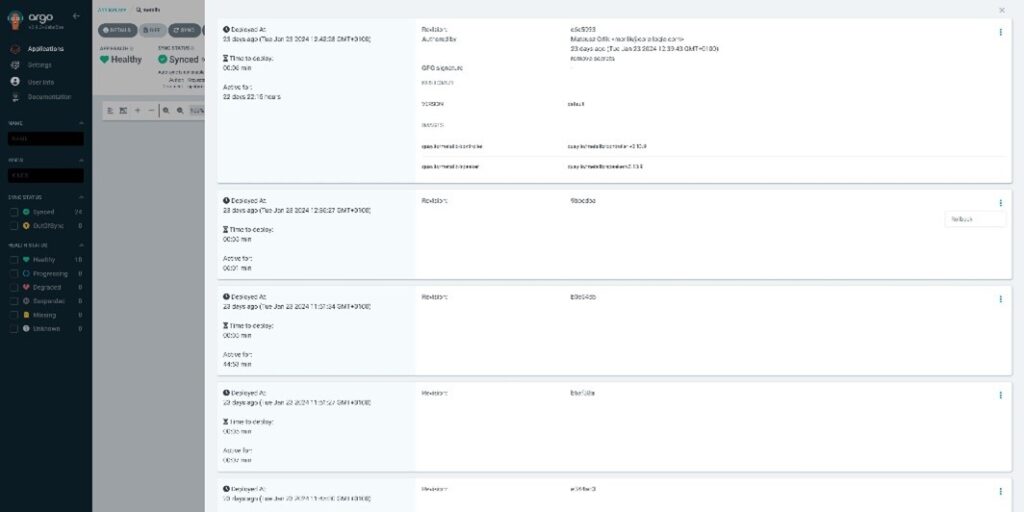
ArgoCD is an essential tool for the safe and monitored upgrade of services in the Kubernetes cluster. Thanks to ArgoCD, it is possible to visually analyze the differences between the prepared manifest and the current state of the environment. But the biggest advantage is the flexible rollback option, allowing you to restore the previous version – making ArgoCD an irreplaceable tool when updating virtually any object of the cluster.
Setting up the application in ArgoCD
W celu skonfigurowania aplikacji w ArgoCD, warto postępować deklaratywnie, opierając się na zdefiniowanym w repozytorium cloud-gitops zestawie manifestów. Choć panel ArgoCD umożliwia bezpośrednie tworzenie aplikacji, w artykule skupiono się na podejściu opartym na deklaracjach w repozytorium, co umożliwia spójne zarządzanie aplikacjami w różnych systemach.
The structure of the application manifest
The declaration of the application should be adapted to the overall structure of the manifest, which will allow for an easier adaptation to specific services. In the present situation, it was assumed that the methodology used in this case would rely on the cloud-gitops repository.
The declaration itself relies on the creation of a new file/manifest in the path.

The manifest should contain the following entry:
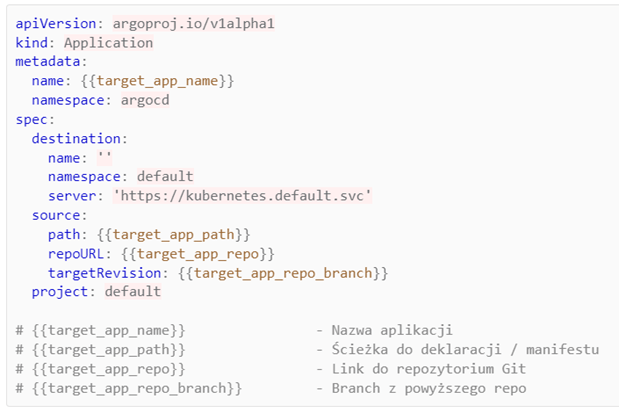
And this is the example declaration for Metallb prod:
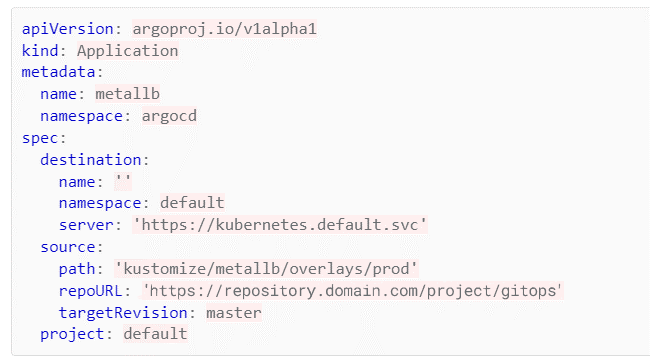
It is advised to create new applications on separate branches in the GIT code repository. This approach allows to maintain the safety of other elements of the cluster, whenever changes are made in a given project. Each application should have its own developing environment, which will make it easier to control and monitor changes. In the situation where previous applications have been created in the cluster, it is advised to turn off the automatic synchronization (Auto-Sync). It is also advised to make sure that Auto-Sync is turned off, or at least is turned off manually on the created branch. You can do so by changing the value of {{target_app_repo_branch}} in the application’s definition.
It is then necessary to delete the entry:
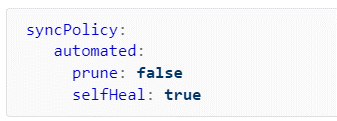
After performing the necessary operations, you can synchronize the main ArgoCD application.
Initial operations before the implementation of MetalLB into ArgoCD
Updating MetalLB in the ArgoCD context requires an appropriate setup of the cluster, especially when it comes to assigning and managing IP addresses. The following are key steps and important notes for the proper assigning of IP addresses before the implementation of MetalLB.
Proper assigning of IP addresses
Assigning IP addresses to services from the cluster, especially with ArgoCD, is not necessary. However, it is best to maintain the rigid configuration of IP addresses for the objects that require it.
It is worth verifying which services require constant assignment of IP addresses, and which can use dynamically assigned addresses. Before executing the next steps, you should verify if the cluster is ready to be updated. In the case of MetalLB, it is essential to declare the IP addresses, especially if they are permanently required.
Maintaining Stable IP Addresses
It is worth checking that services have their constant IP address assigned, especially for services making use of DNS or having declared fixed IP addresses on other services.
For the current cluster that we are updating, all the services did not necessarily have any assigned IP addresses before the update, which resulted in assigning random addresses from the pool. This can result in unexpected changes if services rely on the provided IP addresses.
We can verify that with the following command:

If the address is missing, it should be defined by a manifest, e.g.:
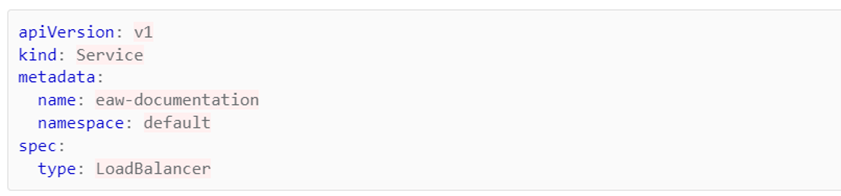
Change the manifest so it looks like this:
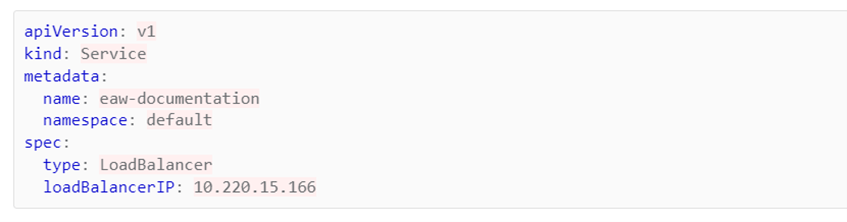
For ArgoCD, the address should be assigned by manually editing the manifest directly on the cluster.

Setting up manifest declarations
Firstly, you should create a path in the ArgoCD application itself, in this case, a folder structure was created.
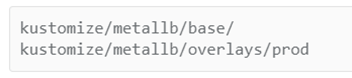
In this example, using the Kustomize tool for the cluster brings an additional value but is not necessarily required for a correct configuration. The use of the Kustomize tool can improve transparency and facilitate the steps for the configuration of the cluster.
This is what the proper file structure looks like:
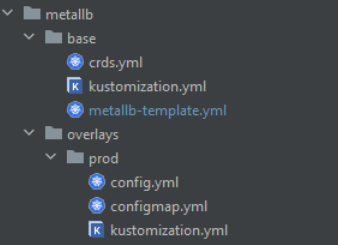
In this present cluster, MetalLB has not been implemented yet with the help of ArgoCD – which requires a full reconstruction of the configuration and confronting it with the current state managed by ArgoCD.
Setting up configmap and IPAdressPool
To set up the cluster for updating, there are a couple of essential steps to follow for the configuration, like setting up configmap or IPAdressPool. It is important that they are necessary to update the cluster, they do not need to be performed when comparing ArgoCD to k8s.
In the new version, the configuration has changed – the new method of assigning addresses requires the setup of configmap and IPAdressPool. To adapt to those changes, it is essential to understand the new procedures for the management of IP addresses. Please note that those steps are essential for the proper configuration of the cluster, but are not required during the comparison operation of ArgoCD to k8s.
In the context of changes in the way addresses are assigned and managed after the update, it is worth noting that in the previous version it was based on configmap, which can be viewed with the following command:

You should see as follows:
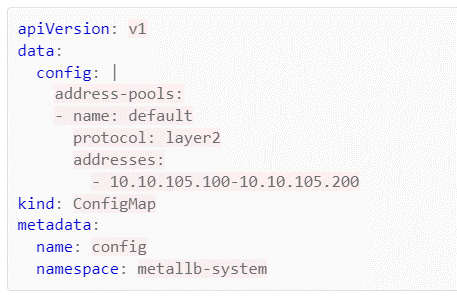
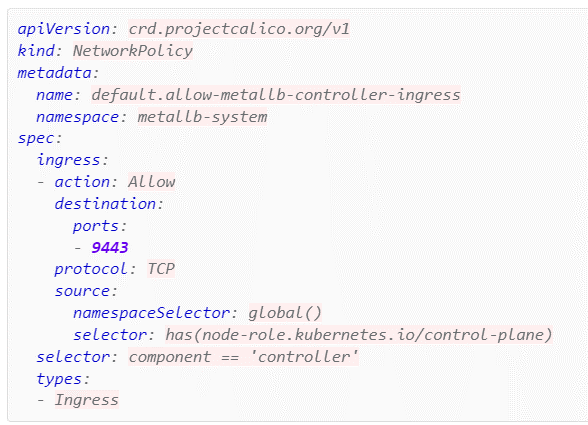
As a result of those changes, it is essential to implement two other manifests, which will modify the way addresses are managed. In the present situation, we had to open an additional port, without which one of the webhooks would not work. This operation was only necessary in our situation, and results solely from its specifications and the functionalities of the service.
Two additional manifests were created on the /metallb/overlays/prod/configmap.yml path, containing a copy of ConigMapy.
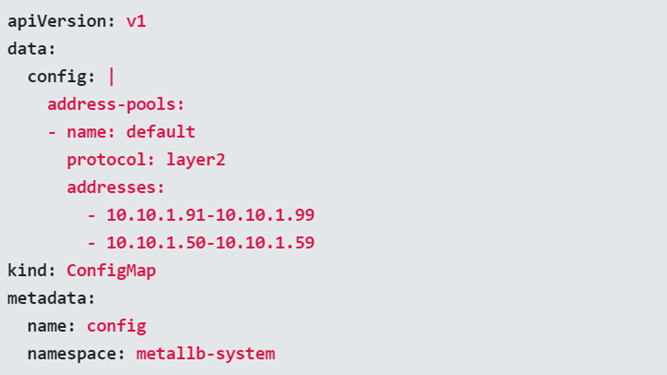
And a manifest containing new declarations and address conifg.yml:
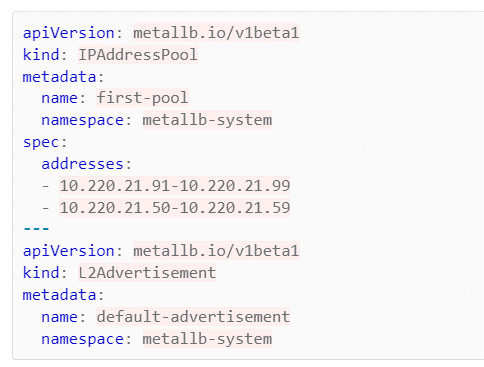
kind: L2Advertisement requires an initial implementation of the /metallb/base/crds.yml file. Without a previous CustomResourceDefinition declaration containing this entry, it will not work.
Like explained previously with the present cluster, a manifest declaration was necessary to open an additional port 9443 without which one of the WebHooks would not work
Example of a declaration in the config.yml file below
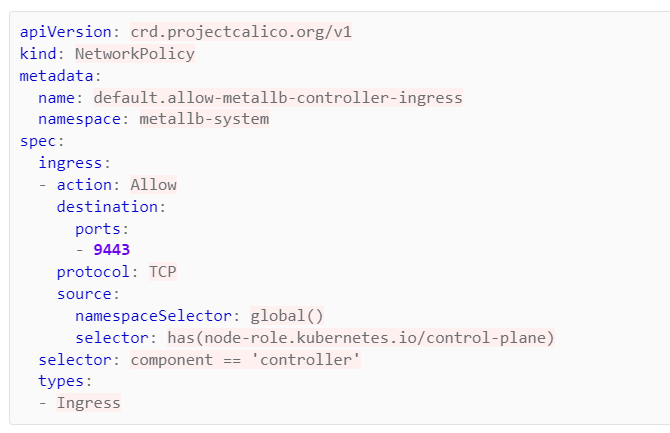
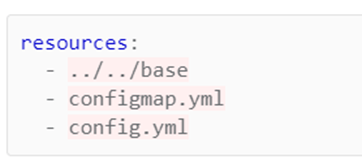
Finally, declare the new files in /metallb/overlays/prod/kustomization.yml
Comparing ArgoCD to the environment
The first step is essential for setting up the manifest for the current version of MetalLB. It is essential since in the current example, the manifest for this application was missing in the Repository and ArgoCD. Without it, we will not be able to safely and efficiently return the operation or do what we call “rollback”.
In ArgoCD, rollback consists of returning to the previous, stable state from the last commit of the indicated repository.
The most efficient way for the comparison of environments is the generation of templates for a specific application with the help of Helma. Specify the current version of MetalLB and generate a template using the following command:

This process will allow you to accurately determine the differences between the current and the earlier version of the MetalLB application, which is crucial for the possible performance of an effective and safe rollback operation.
The current version can be specified by describing under the controller or speaker:

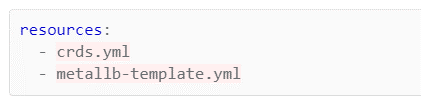
A tip here is to split the manifest into two separate files. One of them should contain all the entries from CustomResourceDefinition, and the other should contain the other objects. The last step here is the addition of appropriate entries to the /metallb/base/kustomization.yml file.
Attention!
It is extremely important not to synchronize the application on the ArgoCD side in subsequent stages. Our current objective is solely to verify the changes and compare the manifest in ArgoCD to the current state of the cluster. When it comes to ArgoCD, we limited our use to only the “Refresh” and “App Diff” buttons.
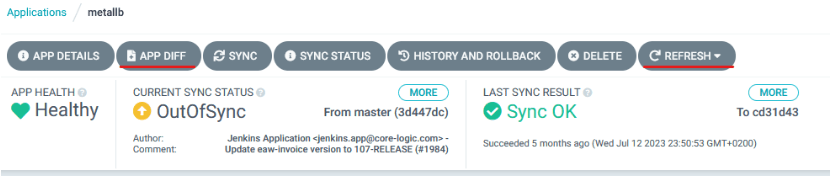
The “App Diff” functionality is key for comparing the changes between ArgoCD and the cluster. It is best to use the “Compact diff” to simplify the change analysis process.
Our mission is to eliminate all the differences by bringing modifications directly in the manifests, and then the execution of commit and push for/in the repository. It is also worth your time to regularly compare the differences with the help of “App Diff”.
In the case of MetalLB you can also make use of the values,yaml file, that can be used for template generation, adding the -f values.yaml flag to the command. It is worth noting that this functionality can be limited in the case of MetalLB, and the values.yaml file becomes more useful for the update of prometheus-stack.
After a successful comparison of ArgoCD with the cluster and once “App Diff” doesn’t declare any major differences, you can start the synchronization process by clicking on “Sync”. Thanks to this process, we gained a restore point, and the implementation of MetalLB by ArgoCD is a complete success.
Setting up the manifest
This process is mostly similar when comparing ArgoCD to the environment. A key change is the generation of the template file with the most recent version of MetalLB with the help of this command:

It is important to remember how essential it is to execute all the operations that we described in the previous step. Because we are working on the update of the version, major changes may appear when you click on the App Diff tool.
It is essential that elements like ‘name’ or ‘namespace’ keep their original value. This means that those key values stay the same even in the case of major changes. Remember that differences in App Diff can be quite significant, so there is a need for conscious monitoring of these changes and possible manual correction to ensure consistency and correctness of the environment configuration.
The update of MetalLB
After the generation of the manifest for the new version, we finally proceed to the upgrade of the application in ArgoCD.
Remember that before proceeding to the updating process it is final to set up the configuration for configmap and IPAddressPool. It’s best to start with the synchronization of CRD objects because those are essential for the configuration and they’re worth implementing before the update.
CRDs are often backward compatible, which means that their update should not have any negative effect on the functioning of the cluster or its services. However, in the case of CRD, it is essential to make the synchronization with the “Replace” option. Forgetting this step could lead to synchronization mistakes in ArgoCD.
After the synchronization of CRD objects, you can proceed to the synchronization of the other elements. After the finalization of this process in ArgoCD, check the status of pods in namespace metallb-system with the following command:

Summary
This was the first part of a post on upgrading a Kubernetes cluster to version 1.25.x. This part discusses the upgrade process for the Argo CD and MetalLB services. In the next entry, we will cover the steps involved in upgrading the Portworx, prometheus-stack and Blackbox Exporter services.
FAQ
The upgrade to Kubernetes 1.25 is particularly important because PodSecurityPolicy was removed in this version and replaced with Pod Security Admission. This means that services previously using PSP must be reviewed and adapted to the new security mechanism.
Before the upgrade, it is worth verifying services such as MetalLB, Portworx, Prometheus Stack and Blackbox Exporter. Each of them may require an update to a version compatible with the new Kubernetes security rules and cluster configuration.
A full backup protects the key elements of the cluster before any changes are introduced. In practice, this includes Kubernetes certificates, manifests and an ETCD backup. As a result, if any issues occur, it is possible to restore the previous state of the environment.
ArgoCD enables controlled deployment of changes, comparison of manifests with the current state of the cluster and quick rollback to a previous version. This makes the MetalLB upgrade more structured and safer, while maintaining full control over configuration differences.

As Vice President of Core Logic, Konrad is responsible for developing technology solutions that support the business growth of clients. He has over 20 years of experience in the IT industry, including leading ambitious projects focused on building, scaling, and securing IT infrastructure. He specializes in DevOps, microservices, and cloud solutions. Konrad combines a technological perspective with a business-oriented approach, enabling him to translate complex organizational needs into stable, secure, and efficient systems.
Let's have a chat!
Are you ready to start your digital journey? Fill in this form or contact us directly by phone.