
Active Directory implementation: centralized IT infrastructure management in Windows environments
- 20 July 2026
- In this article, you will learn:
- What is Active Directory and how do directory services work?
- Active Directory Domain Services (AD DS): the foundation of a Windows domain
- Centralized control with Active Directory
- Managing Active Directory users, groups, and access rights
- Organizational Units (OUs) and delegated management in AD DS
- Using group policy objects in Active Directory
- Authentication and access control in Active Directory Domain Services (AD DS)
- Joining devices to the domain and managing the network
- Domain controller design: why organizations need multiple domain controllers
- Security benefits of Active Directory—and their limits
- Common deployment challenges
- Planning, Windows server licensing, and the scope of AD DS
- Business outcomes after deployment
- When should a business deploy Active Directory?
- Summary
- FAQ
- Porozmawiajmy
In this article, you will learn:
- how to centrally administer users, devices, and company resources;
- how to control user accounts, permissions, and access to data;
- how organizational units and Group Policy simplify Windows environment configuration;
- why a resilient design should include at least two domain controllers;
- how Active Directory improves security and operational efficiency;
- which technical, organizational, and licensing issues to consider before deployment.
Deploying Active Directory is an important step for companies that want to bring order to the organization of devices, user accounts, permissions, and network resources in a Windows-based environment. Manual setup may still be manageable in a very small company. It quickly becomes inefficient, however, when an enterprise operates dozens or hundreds of workstations and the IT team must consistently protect data, apply security settings, control permissions, and keep the network running.
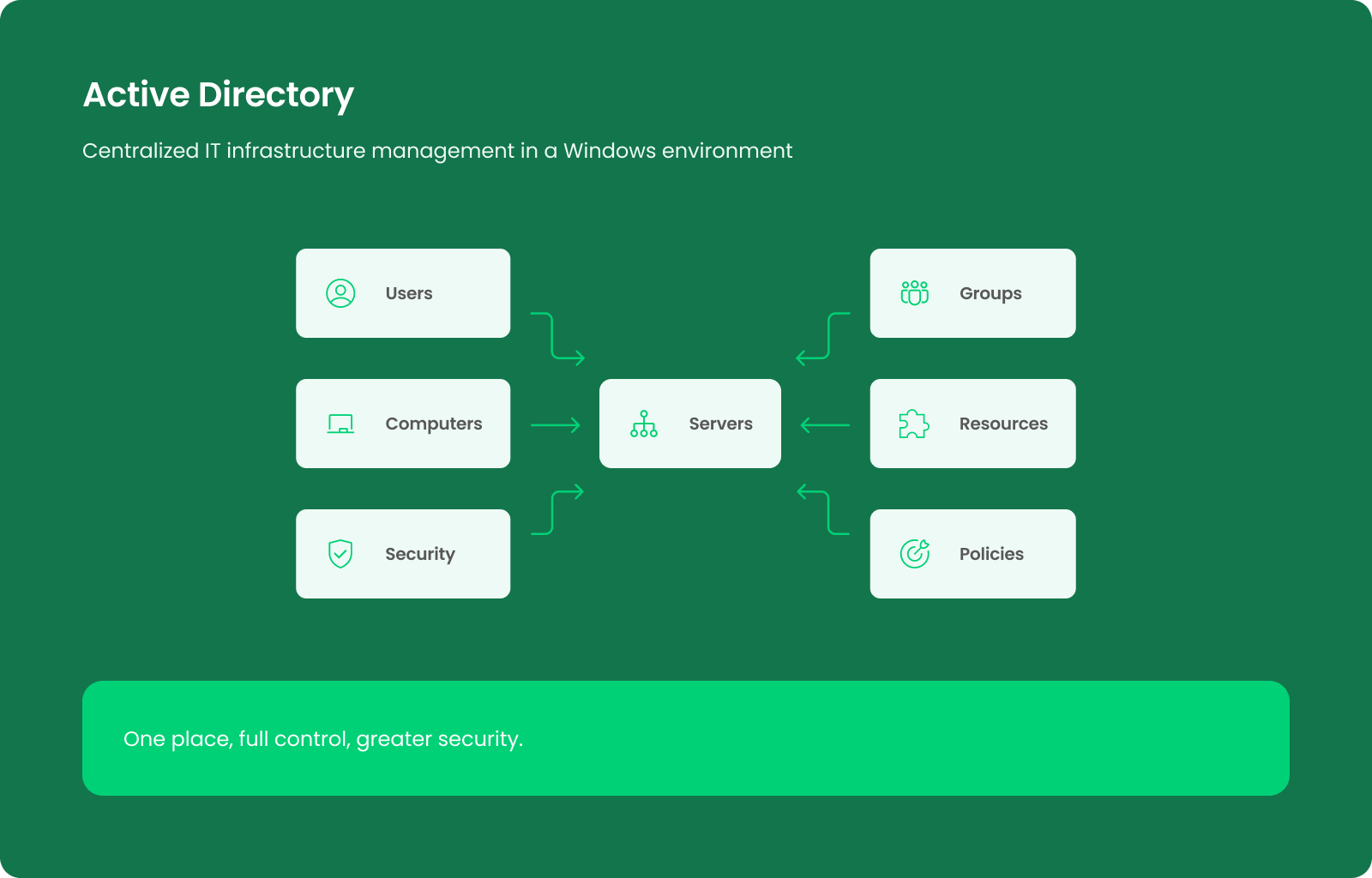
Active Directory replaces isolated configuration on individual endpoints and acts as a centralized control layer. Administrators can manage users and devices, security groups, policies, and shared resources centrally. A new employee receives the correct permissions on day one, while an account belonging to a departing employee is disabled centrally without visiting every workstation or file server.
This approach is particularly valuable when most endpoints run Windows. Active Directory is not a universal platform for every type of infrastructure. Its main purpose is to organize identity, authentication, administration, and permissions inside a Windows domain.
What is Active Directory and how do directory services work?
Active Directory functions as a directory service developed by Microsoft for managing identities and resources in a network. In practical terms, the directory stores information about people, devices, groups, servers, printers, and other objects that belong to an organization. It provides a structured model so that administrators and authorized applications can locate this information and use it to make authorization decisions.
A directory service differs from a simple list of accounts. It combines a hierarchical structure, a searchable data store, authentication mechanisms, and rules that determine what a user or device can do. The structure of Active Directory reflects the way an enterprise operates, such as through its departments, locations, teams, and delegated responsibilities.
The core directory service is Active Directory Domain Services. It is commonly abbreviated as AD DS. This component creates a Windows domain, stores information about identities and resources, authenticates users, and enables policy-based administration. Additional Active Directory services support more specialized needs, but they are not automatically required in every project.
Active Directory Domain Services (AD DS): the foundation of a Windows domain
Active Directory Domain Services (AD DS) provides the methods for storing directory data and making it available to authorized users, computers, administrators, and applications. The AD DS data store is a collection of objects and their attributes. Examples include user accounts, computer accounts, security groups, servers, shared resources, and information about how those objects relate to one another.
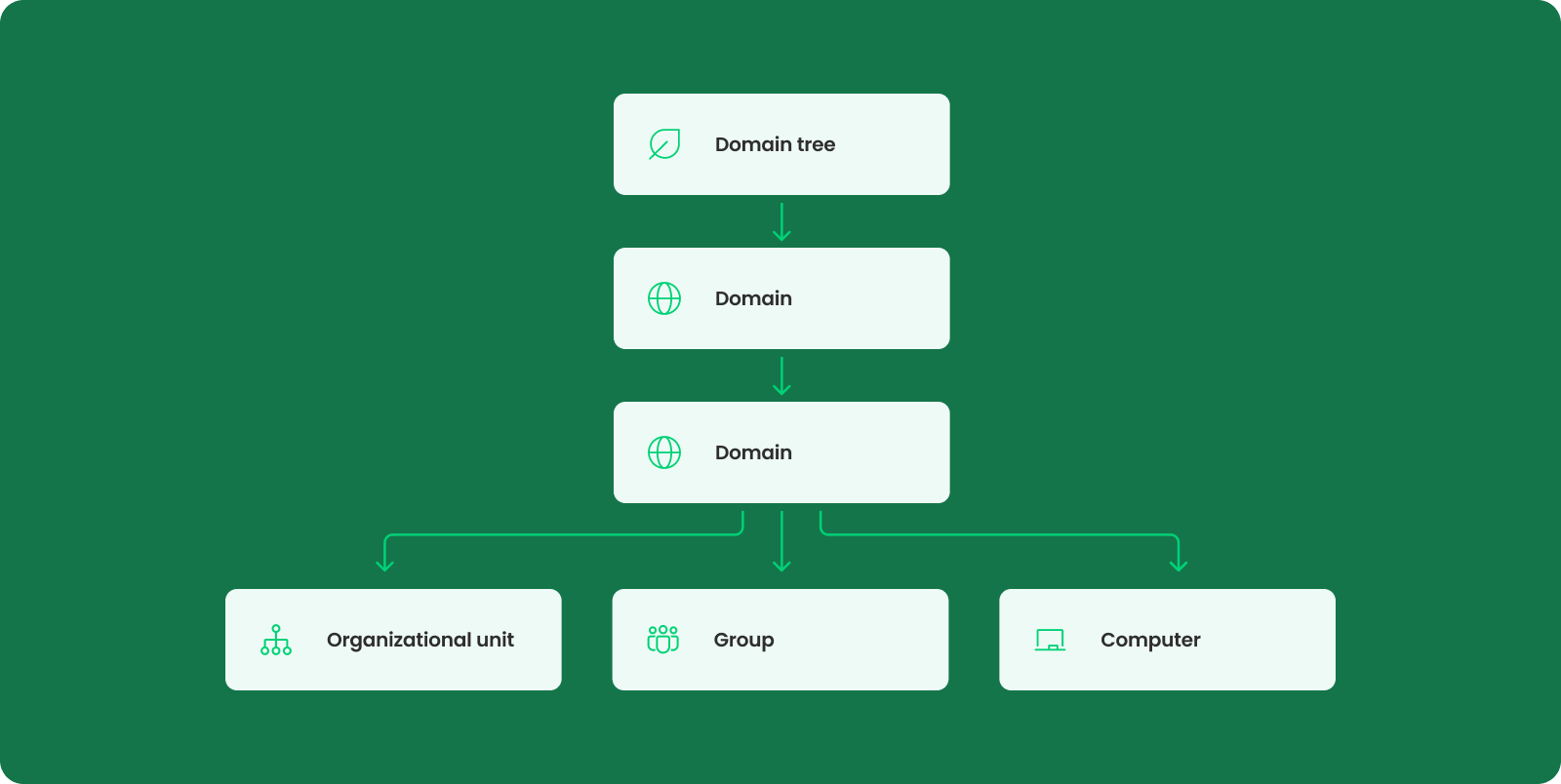
At the center of AD DS is the domain, which serves as a logical security and administrative boundary that brings identities and devices into one managed environment. Security is integrated into AD DS through authentication and access control. When a user signs in, the service validates the identity and helps determine which resources that identity may use. Administrators can then manage permissions through groups rather than maintaining a separate configuration for every person and every folder.
Centralized control with Active Directory
Once AD DS is deployed, administrators can create and disable accounts, join devices to the environment, delegate operational control, apply security baselines, and manage permissions from a central location. They can configure a change once and target it at selected users, devices, or OUs instead of repeating the same task on every workstation.
Without Active Directory, even a straightforward requirement may create substantial manual work. For example, enforcing password rules, locking a screen after inactivity, deploying a printer, or limiting selected Windows settings may require separate configuration on many endpoints. Differences inevitably appear over time, making the environment harder to audit and support.
With Active Directory, the company gains consistent standards and a clearer operating model. Centralization does not eliminate the need for careful oversight, but it makes daily operations repeatable, visible, and scalable.
Managing Active Directory users, groups, and access rights
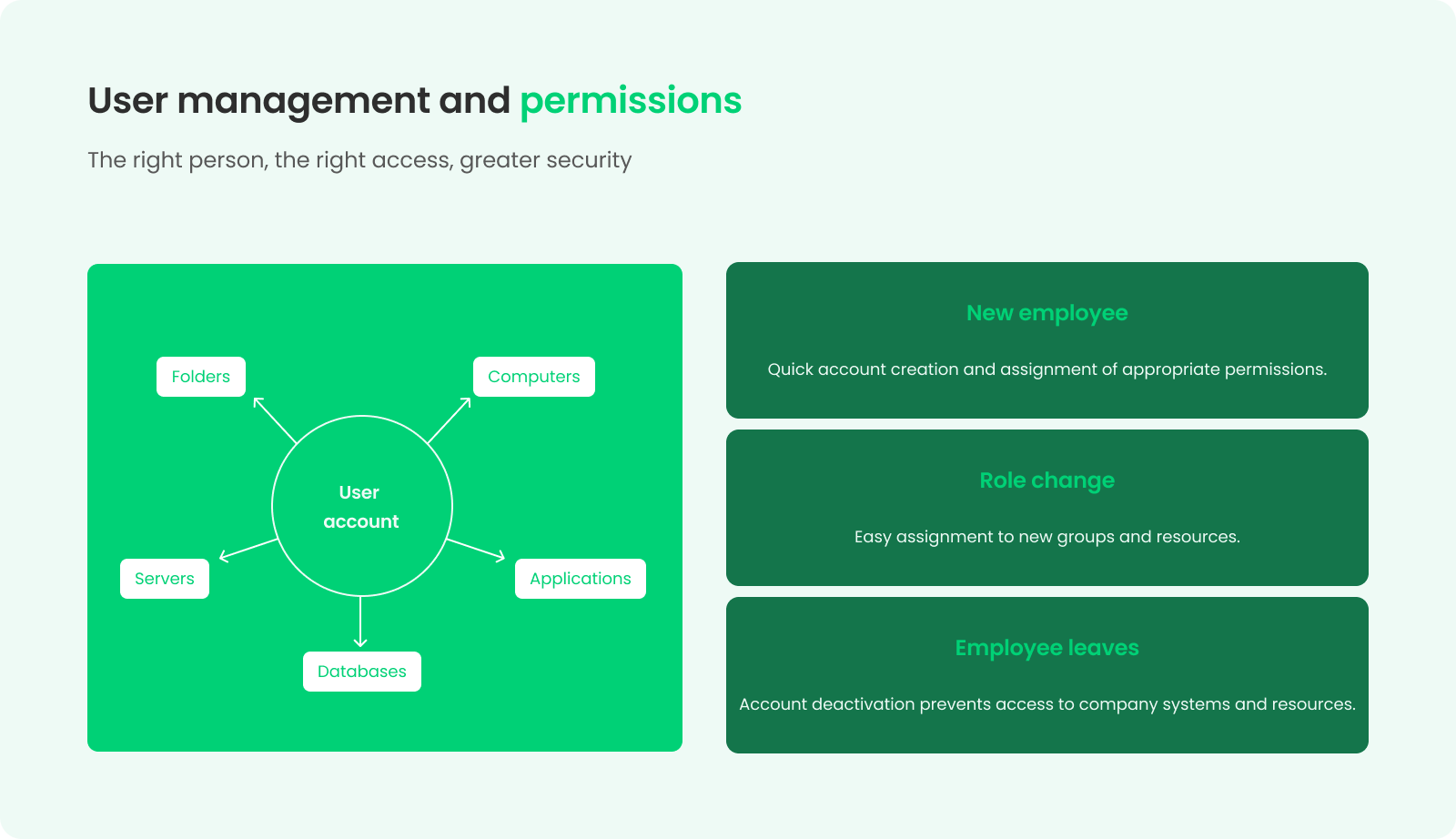
User accounts are among the most important objects in the directory. Each employee receives a domain account that serves as their identity in the network. Based on information about that account and its group memberships, the permission model determines which workstations, applications, file shares, printers, and other resources the user may use.
Administrators manage the complete account lifecycle. A new user receives an account and membership in appropriate groups. If the user moves to another department, those memberships are updated. When the person leaves the organization, administrators can disable the account promptly and restrict access to resources connected to that identity.
Group-based assignment makes this model practical. Instead of assigning rights separately to every user, administrators grant permissions to a security group and place each person in the relevant group. For example, membership in a Finance role provides access to accounting data, whereas an HR role protects personnel files. This approach supports least privilege: users receive only the permissions required to perform their work.
Organizational Units (OUs) and delegated management in AD DS
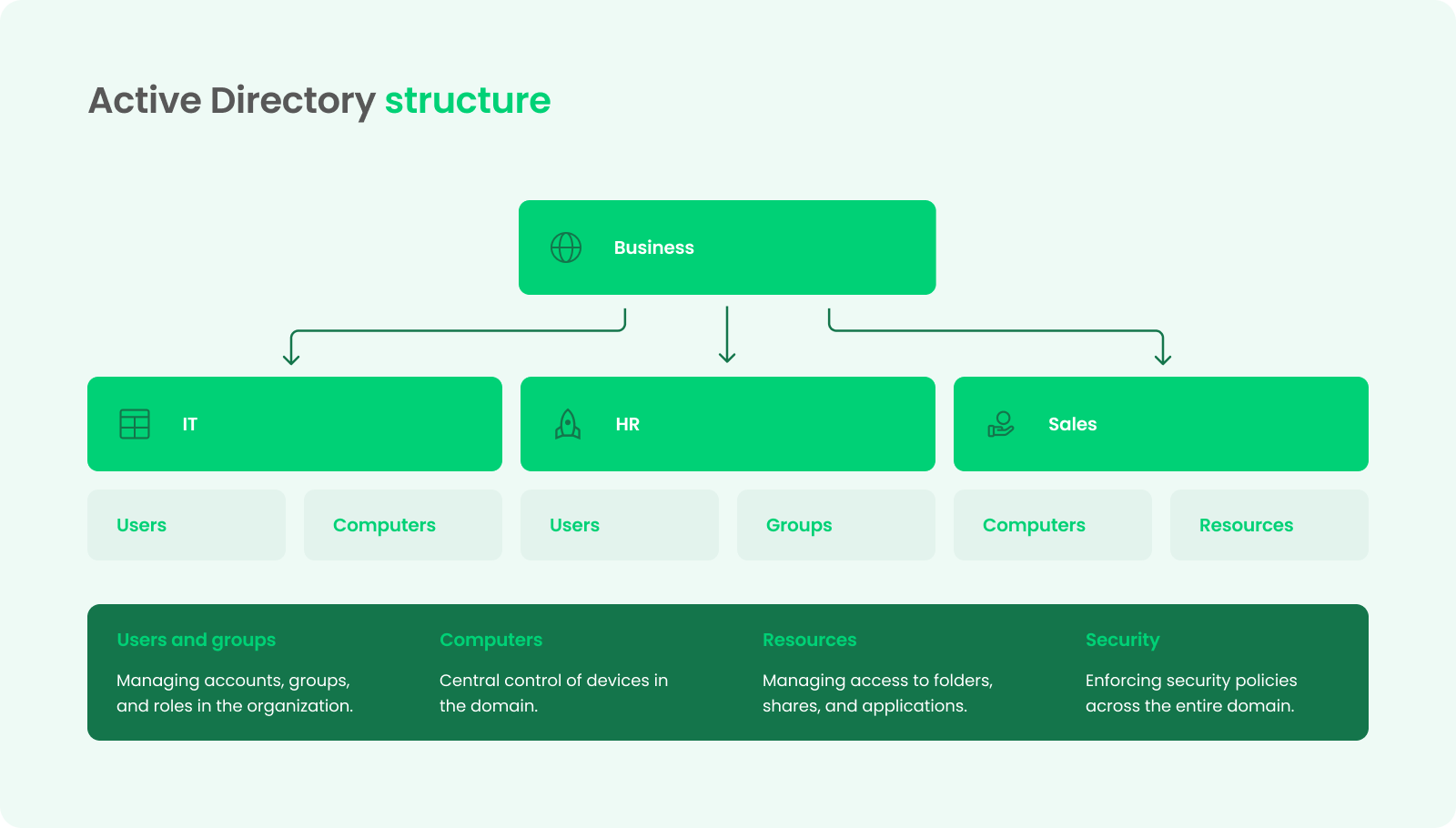
Organizational units (OUs) act as containers within the domain so that policy application and delegated authority follow the company’s needs. They may represent departments, locations, network device types, or another operational model. They should not be treated as a direct copy of the company chart unless that structure also supports stable IT operations.
For example, separate OUs can be created for workstations, servers, privileged accounts, and different locations. Appropriate policies are then linked to those OUs, or limited authority is delegated to local support teams. A help-desk group might be allowed to reset passwords for ordinary user accounts without receiving broader control over the environment.
Using group policy objects in Active Directory
Group Policy is one of the most valuable administrative mechanisms available with AD DS. It allows administrators to configure security and operating settings for domain users and computers. Group policies standardize password-related controls, screen-lock behavior, Windows components, firewall rules, scripts, mapped drives, printers, and many other settings.
Individual configurations are stored in Group Policy Objects. Administrators link these objects to network sites, domains, or OUs and use security filtering when a policy should apply only to a defined set of users or devices. This makes it possible to configure broad standards while retaining exceptions that are documented and justified.
Used correctly, Group Policy reduces configuration drift and gives the IT team a repeatable way to enforce standards throughout the network. It also supports faster onboarding because newly joined devices can receive the required settings automatically.
Authentication and access control in Active Directory Domain Services (AD DS)
Authentication confirms that a user, computer, or service is who it claims to be. In Active Directory Domain Services, sign-in normally depends on the identity, the availability of a domain controller, DNS, time synchronization, and the correct network path. After authentication, authorization rules determine which data and services the identity may use.
AD DS provides a single identity for many resources across the network. This reduces dependence on unrelated local accounts and makes account administration more consistent. It also helps administrators investigate access because group membership and permissions are reviewed through a common directory model.
Permissions should be granted through roles and groups whenever possible. Administrators can restrict access to a sensitive share, an application, or an administrative interface by assigning rights only to an approved group. Privileged accounts should be separated from everyday user accounts, protected more strongly, and used only for administrative work.
Active Directory also works with additional network security controls, including multifactor authentication, endpoint management, privileged identity processes, and cloud identity services. These controls require their own design; deploying AD DS alone does not automatically deliver a complete security program.
Joining devices to the domain and managing the network
Joining a computer changes it from a largely independent device so that it operates as a managed member of the domain. The device receives its own account in the directory, processes applicable policies, authenticates users, and reaches authorized network resources.
This produces a more predictable workstation environment. Administrators can configure settings, deploy selected resources, manage local security options, and respond to company changes through centrally defined rules. When dozens or hundreds of endpoints must follow the same standard, centralized control saves time and reduces human error.
Domain controller design: why organizations need multiple domain controllers
A domain controller is a Windows Server system that hosts AD DS and participates in authentication, directory replication, and policy delivery. Because the service is critical to sign-in and resource access, relying on a single domain controller creates an avoidable point of failure.
A professional design normally uses two or more domain controllers. If one node becomes unavailable, the remaining node continues processing authentication and directory requests, provided that DNS and the rest of the supporting infrastructure are also resilient. This improves availability but does not remove the need for monitoring, backups, or tested recovery procedures.
Where practical, domain controllers should be distributed across separate hosts, failure domains, or physical locations. Redundancy is not a backup. Accidental deletion, malicious changes, or corrupted data may replicate to multiple domain controllers. The organization therefore needs protected system-state backups, documented forest-recovery procedures, and periodic recovery tests. Monitoring should cover replication, DNS, time synchronization, storage, network availability, critical services, and security events across all domain controllers.
Security benefits of Active Directory—and their limits
The security value of Active Directory comes from consistent identity and policy control. Administrators can disable an account centrally, use roles to limit permissions, apply configuration standards, separate privileged duties, and review information about users and computers in the Active Directory network environment.
Centralization also enables a faster response. If a security requirement changes, the IT team modifies an approved policy instead of touching every device. If an employee leaves, the account is disabled immediately and removed from sensitive groups. If a workstation category needs tighter settings, administrators target the relevant OUs.
Common deployment challenges
The most difficult part of a deployment is often not installing the server role. It is understanding the existing environment. Previous configuration attempts, undocumented firewall rules, inconsistent DNS settings, duplicate accounts, local permissions, and legacy applications all affect the project.
In a remediation project, the team must first collect reliable information about what already exists. It should identify which domain controllers and services are functioning, how replication behaves, where DNS records are hosted, which applications depend on current identities, and whether earlier changes follow accepted practices. Only then should administrators create a safe migration or repair plan.
Another common challenge is trying to solve communication problems by opening the entire network. This may make a test appear successful, but it weakens security and hides the actual dependency. A better approach is to document required ports and flows, configure them deliberately, verify the result, and monitor for failures.
The project also needs stakeholder participation. Technical staff configure the platform, but process owners must confirm who should view sensitive data, who approves changes, and how quickly accounts should be created or disabled. Without these decisions, even a well-built directory may reproduce poor permission practices.
Planning, Windows server licensing, and the scope of AD DS
Planning should use reliable information about users, devices, servers, network locations, applications, security boundaries, availability, backup, and support. The team should decide whether a single domain is sufficient, how many domain controllers are required, where they will run, and how the global catalog, DNS, and replication topology will be configured.
Licensing must be reviewed as part of the project. A Windows Server license does not by itself grant every user or device the right to access server services; appropriate Client Access Licenses may also be required. The exact licensing model should be confirmed against the organization’s agreements and current Microsoft product terms.
The scope should also distinguish required components versus optional ones. A typical project may include AD DS, DNS integration, multiple domain controllers, OUs, groups, domain joins, Group Policy, monitoring, backups, and documentation. One or more additional services should become separate workstreams when the company actually needs them.
Business outcomes after deployment
The result of a well-designed deployment is a more controlled and predictable network environment. Administrators gain a unified control model for identities, devices, roles, and policies. Users receive permissions that follow their role, while the company gains a clearer process for onboarding, internal transfers, and offboarding.
The operational benefit grows with scale. Instead of repeating the same task on every device, administrators manage settings through AD DS and Group Policy. Instead of granting folder permissions to individuals one by one, they maintain approved groups. Instead of searching multiple machines for local accounts, they use the directory as the central identity source for integrated resources.
Active Directory also improves visibility. Active Directory stores information about accounts, group memberships, devices, and other objects in a consistent structure. That structure supports service work, permission reviews, audits, troubleshooting, and future infrastructure development.
When should a business deploy Active Directory?
Active Directory is most useful for organizations that operate a predominantly Windows-based network and need consistent control over identities, devices, and permissions. Manual management may remain possible with only a few workstations, but the cost and risk increase as the number of users, devices, applications, and locations grows.
AD DS is particularly valuable when the company wants to standardize security settings, delegate support tasks safely, manage many domain-joined endpoints, and provide controlled access to internal resources. A good design may start relatively simple and expand without losing clarity.
Summary
Active Directory is a central platform for managing a Windows domain. Through Active Directory Domain Services, a company uses a structured directory of users, computers, groups, and resources to authenticate identities, apply Group Policy, and control access throughout the network.
The greatest benefit of Active Directory lies in the move from isolated, manual configuration to consistent administration from a central location. AD DS gives IT teams the tools to manage accounts, organize objects into OUs, use group-based permissions, configure devices, and respond faster to security or staffing changes.
A reliable deployment requires more than installing a role on one server. It calls for a well-designed domain, at least two domain controllers where appropriate, resilient DNS, a considered global catalog design, secure administration, monitoring, backups, recovery testing, and correct licensing. With these foundations in place, the directory supports growth while improving both security and daily operations.
FAQ
The term Active Directory refers to Microsoft’s family of directory-related technologies for Windows environments. In most business discussions, it refers primarily to AD DS, which manages domain identities, computers, groups, authentication, and access to resources.
The project usually includes requirements analysis, domain and DNS design, AD DS installation, configuration of domain controllers, creation of OUs and groups, joining computers, Group Policy deployment, access design, monitoring, backups, documentation, and administrator training. The final scope should reflect the company rather than a generic template.
Multiple domain controllers improve service availability and allow directory data to replicate across servers. If one domain controller fails, the remaining server continues handling many authentication and directory requests. This resilience still depends on correct DNS, network design, monitoring, and recovery preparation.
It enables central account management, group-based permissions, consistent policy enforcement, delegated administration, and faster account blocking. The result depends on secure configuration and ongoing management; the Active Directory platform cannot compensate for excessive privileges, weak monitoring, or untested recovery procedures.

As Vice President of Core Logic, Konrad is responsible for developing technology solutions that support the business growth of clients. He has over 20 years of experience in the IT industry, including leading ambitious projects focused on building, scaling, and securing IT infrastructure. He specializes in DevOps, microservices, and cloud solutions. Konrad combines a technological perspective with a business-oriented approach, enabling him to translate complex organizational needs into stable, secure, and efficient systems.
Porozmawiajmy
Jesteś gotowy, aby razem rozpocząć Twoją cyfrową podróż? Wypełnij nasz formularz lub skontaktuj się z nami telefonicznie.